Football moves fast, and nobody wants to keep switching between apps just to check whether their favourite team has scored. Maybe you’re working on your laptop, chatting with friends, travelling, or watching another match on TV. You still want to know the latest score without opening a new tab every few minutes. That’s where pinning live scores on desktop and mobile phones comes in handy.
At DonPredict, we wish to use this guide to educate you on how to pin live scores, keep football match updates within easy reach, and follow multiple games without making your screen a mess. Whether you’re using a Windows PC, Mac, Android phone, or iPhone, you’ll find practical steps to make checking live football scores easier.
The idea is simple: instead of repeatedly searching for the same match, you set things up so the score is easier to access. Depending on your device and the website you’re using, this could mean pinning a browser tab, adding a website shortcut to your home screen, enabling notifications, or using a supported live-score widget.
One important thing to understand before starting: pinning a live-score page is not always the same as pinning a live score on your screen. A pinned browser tab keeps a website handy, while a widget or floating score overlay may show updates without requiring you to open the page. We’ll cover these options so you can choose the one that works best for your device.
What Does It Mean to Pin Live Scores?
When football fans talk about pinning live scores, they usually mean keeping a live-score page, match update, or score display easy to reach while doing other things on their device. Instead of opening Google every time you want to check a result, you create a quicker way to follow the action. It saves time, reduces unnecessary tapping, and makes it easier to keep up with several matches at once.
Imagine you’re following Arsenal, Real Madrid, and a Champions League match at the same time. You don’t want to keep searching for each fixture whenever a goal goes in. By pinning a live-score website in your browser or creating a shortcut on your phone’s home screen, you can return to the scores in seconds. Some devices and services also support widgets or floating score notifications, which can make match tracking even more convenient.
However, the method you should use depends on what you want to achieve. If you simply want quick access to a football score website, a pinned tab or home-screen shortcut may be enough. If you want scores to appear while using other apps, you may need a supported widget, notification feature, or live activity.
Here is a quick comparison.
| Method | Best for | Does it show scores automatically? |
|---|---|---|
| Pinned browser tab | Keeping a live-score website handy on a computer | Only if the page refreshes or updates live |
| Home-screen shortcut | Opening scores quickly on a phone | Usually opens the website or app |
| Website or app notifications | Receiving goal and match alerts | Yes, when supported and enabled |
| Live-score widget | Checking selected match information at a glance | Yes, if the widget supports live updates |
| Floating score overlay | Seeing a score over other apps | Only with compatible apps or services |
The biggest benefit is convenience. You spend less time navigating menus and more time following the football action. Just remember that not every live-score website supports every pinning method, and the feature names can differ between devices.
How to Pin Live Scores on a Desktop Computer
A desktop computer is a great option if you follow football while working, studying, or browsing the internet. You can leave a live-score page open beside your other tabs and check the latest results whenever you need them. The easiest method is to pin the website in your browser.
1. Pin a live-score website in Google Chrome

Add to Favorites
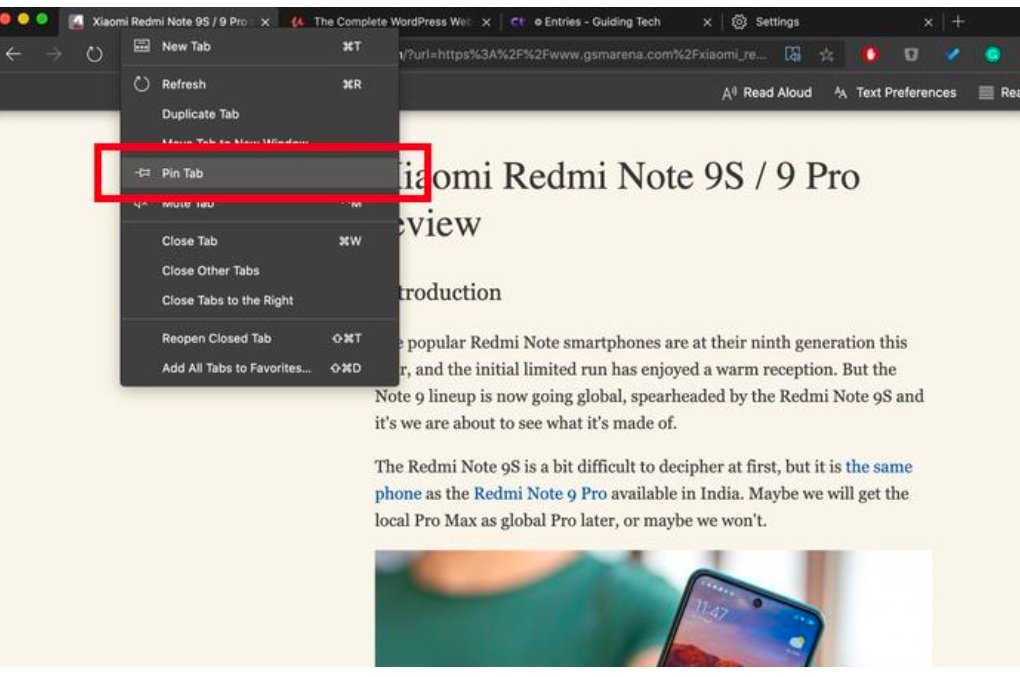
If Chrome is your main browser, pinning a football live-score tab is straightforward. First, open Chrome and visit your preferred live-score website, such as the football live-score page you normally use. Wait for the page to load, then right-click its browser tab at the top of the screen. Select Pin from the menu.
The tab should move towards the left side of the tab bar and become smaller, usually displaying the website’s icon instead of the full page title. This makes it easier to keep the live-score page available while you open other websites.
Now, whenever you start using Chrome, the pinned tab can remain there for quick access. You can switch back to it without typing the website address again.
There is one small detail to remember: pinning the tab does not necessarily mean that scores will update in the background. That depends on how the website handles live data, whether the tab is active, and your browser’s performance settings. If the scores appear stuck, return to the page and check whether it needs a refresh.
2. Pin a live-score tab in Microsoft Edge

Add to Favorites
Microsoft Edge users can follow a similar process. Open Edge, visit the football live-score page you want to follow, and right-click the relevant tab. If your version of Edge offers a Pin tab option, select it to keep the page accessible at the top of your browser.
The pinned tab is useful when your browser has many open pages. Rather than searching through a long row of tabs, you can quickly return to the match updates. This is especially handy during busy football weekends when several leagues have fixtures taking place at the same time.
If you use separate browser profiles for work and personal browsing, consider pinning the live-score page in the profile you use most often. That way, your football page won’t get lost among unrelated work tabs.
Browser features can change between versions, so the exact menu wording might differ. If you cannot find the pin option, look for the browser’s tab menu or consult its current help documentation.
3. Pin a live-score page in other desktop browsers
Chrome and Edge aren’t the only options. Firefox and Safari users can also keep a football website easy to reach, although the exact pinning features depend on the browser and operating system.
In Firefox, you can generally right-click a tab and choose the available pinning option if your version supports it. In Safari on a compatible Mac, you can pin a website tab from the tab’s context menu or the browser’s tab controls.
If your browser doesn’t provide the exact feature you need, there are other options. You can bookmark the live-score page, add it to your bookmarks bar, or create a desktop shortcut where supported. These methods don’t always keep the website permanently visible, but they make it much quicker to reopen.
The goal is not to use a complicated setup. You just want a reliable route back to your scores whenever a goal goes in or a match reaches an important moment.
How to Pin Live Scores on Windows
Windows users have a few additional ways to make football scores easier to access. The best option depends on whether you want a pinned browser tab, a shortcut on your desktop, or a more visible score display.
Create a desktop shortcut for live football scores

Add to Favorites
A desktop shortcut is useful if you regularly visit the same football live-score page. You won’t need to remember the website address or search for it every time you want to check a result.
One simple method is to open the live-score website in your browser and use its menu to find an option such as Save and share, Create shortcut, or Install page as app, depending on the browser and website. Follow the prompts to create the shortcut or app entry.
If your browser does not offer that option, you can bookmark the page instead. You can also create a Windows shortcut manually using the website address as the shortcut location, if you are comfortable with that process.
Once created, the shortcut gives you a direct route to the live scores. You can place it somewhere convenient on your desktop or, where supported, pin the associated app or shortcut to the taskbar or Start menu.
Keep in mind that a shortcut is not a live scoreboard by itself. It opens the website, and the site’s own update system determines whether the scores refresh automatically.
Can Windows show football scores without opening a browser?
This is where things become a little more complicated. Windows does not provide one universal, built-in football scoreboard that works with every league and website. You may find widgets, supported apps, or browser extensions that display sports updates, but their features vary.
Before installing anything, check whether it supports the competitions you follow, how frequently it updates, and whether it comes from a trustworthy developer. Avoid software that requests unnecessary permissions or promises unrealistic features.
For many football fans, keeping a live-score tab open is still the simplest solution. If you need the score to remain visible while working, you can place the browser in a narrow window beside your main application. It is not a dedicated floating scoreboard, but it gives you a clear view of match updates without repeatedly switching screens.
How to Pin Live Scores on a Mac
Mac users can also keep football live scores close by, whether they use Safari, Chrome, or another supported browser.

Add to Favorites
Start by opening the live-score website you want to follow. If you’re using Safari, check whether your version supports pinned tabs. If it does, use the tab controls or right-click the tab and select the available pinning option. The website should remain available at the left side of the tab bar.
If you use Chrome on your Mac, the Chrome pin-tab process is much the same as on Windows. Open the score page, right-click the tab, and select Pin.
You can also save the website as a bookmark or add a supported website shortcut to make opening it quicker. Depending on your macOS version and browser, the available installation or shortcut options may vary.
A useful setup is to keep the live-score page in a separate browser window. Resize that window and place it beside your work application. This lets you follow the latest score while writing, studying, or browsing other websites.
For Mac users who want notifications rather than a permanently visible page, check whether the live-score service offers browser notifications or a compatible app. Enable only the alerts you actually need, such as goals, full-time results, or selected matches. Otherwise, a busy matchday can turn your notification centre into a wall of football updates.
How to Pin Live Scores on Android Phones
Android phones offer several practical ways to follow live football scores without repeatedly searching for the same match. You can add a website shortcut to your home screen, use a live-score app, or enable notifications for selected fixtures.
1. Add a live-score website to your Android home screen

Add to Favorites
This is one of the easiest ways to access live football scores on an Android phone.
Open Chrome or another supported mobile browser and visit your preferred football live-score website. Once the page has loaded, open the browser menu, usually represented by three dots. Look for Add to Home screen or a similar option.
Depending on the browser and website, you may see an option to create a shortcut or install a web app. Follow the instructions and confirm the name if the browser asks you to do so.
After that, an icon should appear on your phone’s home screen. Tap it whenever you want to check football results. You won’t have to type the website address or search for the same page every time.
If you’re using a live-score page that allows you to select a particular competition or match, choose the relevant section before creating the shortcut, where the site supports it. That can make the experience more convenient.
Remember, a home-screen shortcut normally opens a page; it doesn’t automatically create a floating scoreboard. If you want goal alerts while using other apps, check whether the website or its official app supports notifications.
2. Use Android notifications for goal alerts
Notifications can be more convenient than keeping a live-score page open all day. When supported, they let you receive match updates even while you’re using another app.
First, check whether your chosen live-score website or app offers alerts for specific teams, matches, or competitions. Open its settings and look for notification preferences. You might be able to select goal alerts, half-time updates, full-time results, or other match events.
Next, make sure Android allows the app to send notifications. Depending on your phone’s manufacturer and Android version, you can usually find this under Settings → Apps → → Notifications. The wording and menu layout can differ between devices.
Only enable the alerts that matter to you. If you follow several leagues, notifications for every goal in every match can become distracting very quickly. Selecting just a few teams or fixtures is often a better approach.
Also, notification delivery isn’t always instant. It can depend on the service, internet connection, battery-saving settings, and your device’s background activity restrictions. If alerts are delayed, check these settings before assuming the live-score service is not working.
3. Can Android display a live score over other apps?
Some Android apps and devices offer floating windows, picture-in-picture features for supported content, or other overlay tools. However, these features do not automatically work with every football live-score website.
If your chosen app has an official floating scoreboard feature, follow its instructions and review the permissions it requests. A feature that displays content over other apps may require a special permission on Android.
Be careful with unknown applications that request broad access to your screen or other sensitive information just to display football scores. Choose reputable apps, review their permissions, and avoid installing tools from unfamiliar websites.
If no reliable overlay is available, a notification or home-screen shortcut is usually the simpler option. You can still follow the score without making unnecessary changes to your phone’s settings.
How to Pin Live Scores on an iPhone
iPhone users can keep football live scores easy to reach through Safari, the Home Screen, supported widgets, and notifications. The exact method depends on whether you want a quick website shortcut or match updates that appear without opening the browser.
1. Add a live-score website to your iPhone Home Screen

Add to Favorites
If you use Safari, adding a football live-score website to your Home Screen is a simple starting point. Open Safari, visit the website, and navigate to the live football scores you want to follow. Tap the Share icon, which usually looks like a square with an arrow pointing upwards.
Scroll through the available actions and select Add to Home Screen. If you don’t see the option immediately, check the available actions in the share menu. The layout can vary depending on your iOS version.
You may be able to edit the shortcut’s name before adding it. Choose something easy to recognise, such as “Live Football Scores”, and confirm the action. The website shortcut should now appear among your apps on the Home Screen.
Next time you want to check a match, tap the icon and return directly to the website. It’s a convenient alternative to searching for live scores every time a match kicks off.
However, this method does not guarantee that the score will remain visible on top of other apps. It simply gives you faster access to the live-score page. For a more glanceable experience, consider a supported widget or live activity.
2. Use iPhone widgets for football updates
Widgets can be a useful way to see information without opening an app first. Depending on the football app and the version of iOS you use, a widget may display selected matches, upcoming fixtures, or recent results.
To check whether your chosen app offers a widget, touch and hold an empty area of your Home Screen until the icons enter edit mode. Tap the option to add a widget, search for the relevant football or sports app, and review the available widget sizes and styles. Choose one and add it to your Home Screen if the feature is supported.
Some widgets display only general sports information, while others allow you to select a favourite team or competition. Don’t assume every widget will show continuously updating scores. Check what information it actually displays and how often it refreshes.
You can also check the iPhone’s Today View, depending on your iOS setup, for supported widgets. This provides another place to keep useful information without filling your main Home Screen with too many icons.
3. What about Live Activities on iPhone?
Apple’s Live Activities feature can display certain ongoing updates on supported iPhones and compatible apps. Depending on the device, iOS version, and app, these updates may appear on the Lock Screen or in the Dynamic Island on supported models.
For football fans, a compatible sports app may offer a Live Activity for a selected match. This can make it easier to check the score without repeatedly opening the app.
To use it, install a reputable football scores app that explicitly supports Live Activities. Open the app, find a match that offers the feature, and follow the instructions to start its live update. You may also need to allow Live Activities in your iPhone settings.
The important part is compatibility. Not every football scores app supports this feature, and not every match will be eligible. If you cannot find a Live Activity option, check the app’s current documentation or settings rather than assuming your phone is faulty.
For many iPhone users, a Home Screen shortcut plus selected notifications is already enough. You don’t need to install five different apps just to know whether your team has scored.
How to Pin Live Scores on the Pin Live Score Website
If you want to use the football live-score page at PinLiveScore, begin by opening the website in your preferred browser:
Visit PinLiveScore Football Live Score
Once the page opens, look for the live match listings and identify the fixture you want to follow. Check the displayed teams, competition, match time, and current score before relying on the information.
From there, you can use your browser’s supported features to make the page easier to access. On a desktop, pin the tab if the browser offers that option. On a phone, consider adding the page to your Home Screen through the browser’s shortcut feature.
There is an important distinction here: these are browser-level methods for accessing the page. They do not confirm that PinLiveScore has a dedicated floating scoreboard, an official mobile app, or a match-specific pinning feature. Those capabilities should be checked directly on the website rather than assumed.
If the page offers a specific pinning button or match-following feature, follow the instructions provided by the site. If no such option is visible, you can still use the standard browser methods explained above.
What if the live score stops updating?
Live-score websites can occasionally show delayed or stale information. This may happen because of a weak internet connection, temporary website issues, browser caching, or a delay in the underlying data feed.
Start by checking whether other pages load normally. Then return to the live-score page and refresh it. If the score still looks wrong, compare it with another reliable live-score service or the competition’s official match coverage.
Always check the match status as well. A game marked as half-time, suspended, abandoned, or finished may not update in the same way as a match currently in play.
Don’t assume that a browser refresh will solve every issue. If several sources show different scores, wait for a reliable update before treating the result as confirmed. This is particularly important during controversial goals, VAR reviews, and matches with lengthy stoppage time.
How to Keep Football Scores Visible While Using Other Apps
Sometimes pinning a tab isn’t enough. You might want to read messages, work on a document, watch a video, or browse social media while still keeping an eye on a match.
The best method depends on your device and the features offered by your chosen live-score service.

Add to Favorites
On a desktop computer
Keep the live-score page open in a separate window and resize it beside your main application. You can view both windows at once without switching tabs every few minutes.

Add to Favorites
On Android
Use supported goal notifications or a compatible widget. These options let you receive updates without keeping the full website open in the foreground.

Add to Favorites
On iPhone
Check whether your football app supports Live Activities or widgets. These can display selected match information in places where you can check it quickly.
If you use a browser extension for floating scores, make sure it comes from a trustworthy source. Read its permissions carefully, especially if it asks to read or change data on websites you visit.
A permanent floating score is not necessary for everyone. Sometimes a single notification when your team scores is more useful than having a scoreboard occupying part of your screen throughout the entire match.
How to Follow Multiple Football Matches at Once
Football schedules can get busy, particularly on weekends, during European competition nights, and near the end of a league season. Several games may kick off at the same time, so following every match individually can quickly become confusing.
The first step is to decide which fixtures matter most to you. You might want to follow your favourite club, a title race, a relegation battle, or a particular tournament. Select the matches you genuinely care about instead of trying to monitor every game on the schedule.
Next, choose a live-score page that displays multiple fixtures clearly. A good layout should help you identify the teams, current scores, match minutes, and match status without unnecessary scrolling. If the site lets you filter by competition or date, use those options to narrow down the list.
On a desktop, keeping the live-score page in its own window can make it easier to follow several games together. On a phone, a pinned shortcut helps you return to the score list quickly, while app notifications can alert you to major events.
Be careful not to confuse a score update with a confirmed final result. A goal may be under VAR review, or a match may have additional stoppage time. If a result matters to you, check the match status and confirm the final score from a reliable source.
The trick is to organise your attention, not overload it. Three carefully selected matches are often easier to follow than fifteen fixtures sending updates all afternoon.
How to Get More Accurate Live Football Score Updates
Convenience is useful, but accuracy matters just as much. A live-score page is only helpful when the information is reasonably current and clearly presented.
First, use a reliable internet connection. If your mobile signal is weak, score updates may arrive late even when the website itself is working correctly. Switching to a stable Wi-Fi connection or a stronger mobile network can help.
Second, understand that different services may receive match data from different providers. During a busy moment, one page may update a goal slightly earlier than another. Small delays do not automatically mean a service is unreliable, but repeated discrepancies are worth checking.
Third, confirm important events through more than one reputable source. Official competition websites and club channels can help verify results, although their updates may also have delays. If a score seems unusual, refresh the page and check the match status before sharing it.
Finally, keep your browser and operating system updated. Updates can improve compatibility, performance, and security, although they won’t eliminate every possible delay in live-score data.
No live-score service should be treated as perfectly instantaneous. A few seconds can make a difference during a fast-moving game, so it’s sensible to regard scores as live information that may occasionally require confirmation.
Common Problems When Pinning Live Scores and How to Fix Them
Even when you follow the right steps, you may run into a few issues. The good news is that most are easy to troubleshoot without installing extra software or changing complicated settings.
| Problem | Possible reason | What to try |
|---|---|---|
| The pinned tab disappears | Browser settings or a closed browser session | Reopen the page and pin it again |
| Scores are not updating | Weak connection or delayed data feed | Refresh the page and check another reliable source |
| Home-screen shortcut is missing | Shortcut creation did not finish | Repeat the browser’s Add to Home Screen process |
| Goal notifications are not arriving | Notifications are disabled | Review the app and device notification settings |
| Widget shows old information | Background refresh limitations | Open the app and check its refresh settings |
| Page loads very slowly | Too many open tabs or limited memory | Close unnecessary tabs and retry |
Why does my pinned live-score page stop updating?
A pinned tab does not force a website to refresh continuously. Some pages update scores automatically, while others need to be reloaded. Your browser may also reduce background activity to save battery or system resources.
Start by refreshing the page. If that doesn’t work, check your connection and whether the website is responding normally. You can also try opening the page in another supported browser to see if the problem is browser-specific.
Why can’t I find the Add to Home Screen option?
The option can appear in different places depending on your browser, phone, and operating system. On Android, check the browser’s main menu. On an iPhone, open Safari’s Share menu and look through the available actions.
If the option is unavailable, you can usually save the page as a bookmark instead. It might not create an app-like icon on every device, but it still provides a quicker way to return to your live scores.
Do I need to download an app to pin live scores?
No. If your main goal is to open a football live-score website quickly, a browser tab, bookmark, or home-screen shortcut may be all you need. An app becomes useful if you want features such as team alerts, custom widgets, or supported Live Activities.
Before installing an app, check its developer, privacy information, permissions, and compatibility with your device. Avoid downloading applications simply because they promise to display scores in a way your phone does not support.
Tips for a Better Live Football Score Experience
Getting your live scores set up is only half the job. A few small adjustments can make checking results easier and less distracting, especially when several matches are happening together.
Choose one main live-score page. Instead of opening lots of different websites, start with a reliable page that covers the competitions you follow. You can use another source to confirm important results when needed.
Keep your shortcuts organised. Give your live-score shortcut a clear name and place it somewhere easy to find. On a computer, pin the relevant browser tab. On a phone, put the shortcut on a convenient Home Screen page.
Customise your notifications. If your chosen app supports match alerts, select the teams and events that matter to you. You probably don’t need a notification for every goal in every league.
Check your battery settings. Background restrictions can affect how some apps refresh information or deliver notifications. Review the settings if updates are consistently delayed, but remember that allowing more background activity may increase battery use.
Use a screen layout that works for you. Desktop users may prefer a narrow browser window beside their main application, while mobile users may find notifications more practical than a constantly open page.
Protect your privacy. You shouldn’t need to share passwords or grant unrelated permissions just to view football results. Stick to reputable websites and apps, and avoid suspicious extensions or unofficial downloads.
These adjustments won’t guarantee instant updates, because the website’s data feed and your connection still matter. They can, however, make your overall experience more convenient and dependable.
Is Pinning Live Scores Better Than Using a Football Scores App?
That depends on how you follow football. A pinned website is convenient if you want quick access to scores without installing another application. A dedicated app may be better if you need personalised notifications, widgets, team favourites, or match-specific features.
| Feature | Pinned website | Dedicated live-score app |
|---|---|---|
| Quick access | Yes | Yes |
| Requires installation | Usually no | Yes |
| Personalised match alerts | Depends on website support | Depends on app features |
| Home-screen access | Through a shortcut where supported | Usually through the app icon |
| Widgets | Depends on available support | Depends on app and device |
| Data and battery usage | Depends on page activity | Depends on app activity |
| Works across devices | Often, through a browser | Depends on app availability |
For someone who mainly checks final scores and match minutes, a pinned website may be enough. If you follow many teams and want notifications throughout the day, an app with suitable alert settings may be a better fit.
There is no need to choose the most complicated option. Start with the simplest method, see how it works for you, and only add other tools if they provide a feature you actually need.
Conclusion: The Easiest Way to Pin Live Scores on Desktop and Mobile
Knowing how to pin live scores with desktop and mobile phones makes it easier to follow football without constantly searching for the same fixtures. Whether you’re using a Windows PC, Mac, Android device, or iPhone, you have several options for keeping match updates close at hand.
On desktop computers, pinning a browser tab is a straightforward way to keep a live-score website accessible. On Android phones, a home-screen shortcut and supported goal notifications can make checking results much quicker. On iPhones, Safari shortcuts, compatible widgets, and Live Activities provide additional ways to follow selected matches.
For DonPredict.com readers, the best approach is to start with a trusted football live-score page, make it easy to access, and choose notifications or widgets only when they add genuine value. Remember that pinning a page doesn’t guarantee automatic updates, and not every website supports floating scores or match-specific widgets.
If your scores stop updating, check your connection, refresh the page, and verify important results through a reliable source. Keep your setup simple, protect your device, and enjoy following the matches without unnecessary hassle.
Ready to get started? Open the PinLiveScore football live-score page, choose the fixtures you want to follow, and use the desktop or mobile method that best suits your device.
Frequently Asked Questions (FAQs)
1. How do I pin live football scores on my computer?
Open your preferred football live-score website in Chrome, Edge, or another supported browser. Right-click the website’s tab and choose the available pin option. The tab stays easy to access, although automatic score updates depend on the website and browser.
2. How do I pin live scores on my Android phone?
Open the live-score website in a supported mobile browser, access its menu, and select Add to Home screen if the option is available. You can also use a compatible football scores app if you want personalised match alerts or widgets.
3. Can I pin live scores on an iPhone without downloading an app?
Yes. Open the live-score website in Safari, tap the Share icon, and select Add to Home Screen. This creates a shortcut for quick access. For score updates displayed elsewhere on your phone, you will need a compatible widget, notification feature, or Live Activity where supported.
4. Can I see live football scores while using other apps?
Yes, depending on your device and the available features. You can use notifications, supported widgets, or compatible Live Activities. On a desktop computer, keeping the score page open in a separate window is another simple solution.
5. Why are my pinned live scores not updating in real time?
Updates may be delayed by your internet connection, browser settings, background activity restrictions, or the website’s data feed. Refresh the page, check your connection, and compare the result with another reliable source if necessary. Pinning a page alone does not guarantee continuous updates.
For more football updates, match previews, results, and useful sports content, keep visiting DonPredict